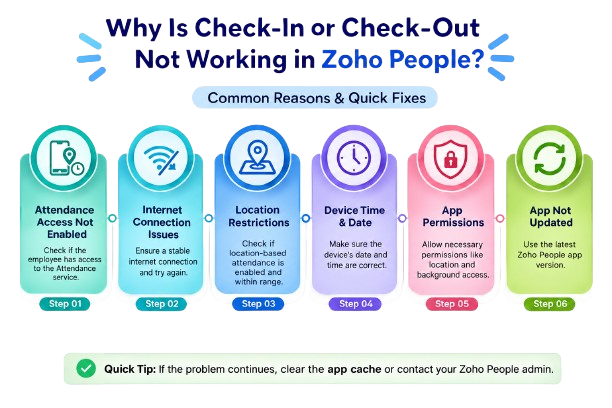
If an employee cannot check in or check out in Zoho People, the first things to check are attendance access, IP restrictions, geo restrictions, and the employee's attendance configuration.
The Employee Does Not Have Attendance Access
Zoho People allows administrators to control access to services through roles and permissions. Attendance access can therefore depend on the employee's assigned permissions.
What to check:
Verify that the employee has access to the Attendance service.
IP Restriction Is Blocking Attendance
Zoho People can restrict where employees are allowed to mark attendance by IP address. These restrictions can be configured for specific users or all users.
If the employee is accessing Zoho People from an IP address outside the configured range, check-in or check-out can be blocked.
What to check:
Go to:
Settings → Attendance → Permissions → IP Restriction
and verify whether the employee's current IP is allowed.
Geo Restriction Is Blocking Attendance
Zoho People can also restrict attendance marking based on the employee's physical location. Employees can be restricted to a defined geographical area for attendance.
If the employee is outside the configured geo-restricted area, check-in or check-out will be blocked.
What to check:
Go to:
Settings → Attendance → Permissions → Geo Restriction
and verify whether the employee is within the permitted location.
The Employee Is Using an Employee Profile Instead of a User Account
Zoho People distinguishes between Users and Employee Profiles.
Users have access to Zoho People web and mobile services and can use web or mobile check-in/check-out. Employee Profiles do not have web or mobile access.
What to check:
Confirm that the employee is added as a User if they need to check in or check out themselves.
Check the Attendance Configuration
Zoho People administrators can configure attendance policies, including how check-in and check-out entries are handled.
Specific attendance policies can also be configured for particular users, employment types, departments, designations, or shifts.
What to check:Review the employee's applicable attendance policy and specific policy settings.
Mobile Check-In Depends on the Attendance Configuration
Zoho People supports check-in and check-out through the mobile application, but the available attendance features depend on the organization's configuration.
If the employee is using the mobile app, check whether mobile attendance is available for their account and configuration.